Wednesday, July 17, 2013

Disolve or wipe fails

Issue: Cannot add dissolve or wipe

Transition effect gets error message
There is not enough spare video / audio at the ends of the clip to create a transition such as a disolve


Warning that there is not enough video or audio for transition

Solution:

Set the IN and OUT points for clips on the timeline so that there is at least a few seconds of video / audio beyond the edit point.

Explanation:

Dissolves wipes and other soft cutting effects are created by overlapping two video or audio clips. The overlapping takes place beyond the edit point. When preparing the edit you need to leave enough video / audio for the transition.

NOTE: Watch out for camera cuts near edit points. These can cause unwanted image flashes during transitions.

Other digital video editing issues

Can not capture video for editing

Issue: Unable to control camcorder or VCR using editing software

Camcorder will not playback in final cut pro / there are no controls on the log and capture window.

This happens if the camera is not connected by firewire, powered on and set to VCR before the log and capture window opens.


Log and capture window missing play controls

Solution:

Close the log and capature window. Connect the camcorder by firewire, power it on and set to VCR reopen the log and capture window.

Explanation:

Final Cut Pro can be used to log clips without a VCR or tape deck attached. You can type timecode IN and OUT points into the boxes, press log clip and give the clip a name. You can then connect the VCR or tape deck and use batch capture to ingest the footage.

Other digital video editing issues

Video editing project lost

Issue: Editing missing, not saved

Issue: Lost deleted all work / computer has crashed and everything has gone.
This can happen for a number of reasons, such as forgetting to save or unexpected power outages


Restore list from autosave vault

Solution:

Restore the project to the most recent good version.

Explanation:

Final Cut Pro has a feature called the ‘Autosave Vault’ . A backup of each open project is made every thirty minutes. If the project has been re-named or ‘saved as’ these backup copies will not be available from the file menu command. They can be located by opening the folder: > final cut pro documents > autosave vault > project name.fcp (the name before the project was renamed or saved as)
Other digital video editing issues

Missing video or audio in editing

Issue: Video clips have disappeared

Media Offline
Source audio or video has been moved or deleted. Can also happen where footage has been logged but not yet batch captured.


Media Offline shown by warning screen and red diagonal line through clip in browser.

Solution 1:

Use the Reconnect Media command under the file menu, use search to find the clip and then reconnect. If more than one clip has gone offline you may be able to reconnect them in one operation.

Solution 2:

Attach a camcorder or video tape deck with source tape loaded, set camera to VCR and batch capture.

Explanation:

Final Cut Pro is a non destructive editing system. All edits are made using references to clips not the actual clip. Editing can continue even when the media is not there.
If the actual video file has been moved, or not been ingested onto the computer you are editing on then the clips are marked as Media Offline. References to them will still stay in place as part of the edited video until they are reconnected.\
Other digital video editing issues

No picture or sound on playback

Issue: Some or all tracks won't play

Picture / Sound can not be seen / heard on playback
This can happen when one or more tracks is turned off.


Timeline with tracks v1 a1 a2 turned off

Solution:

Re-activate the track by clicking on the film / speaker icon next to the track marker

Explanation:

It is sometimes useful to exclude one or more tracks from playback. For example playing back mucic and effects tracks without dialog. All tracks can be turned on or off independantly.

Other digital video editing issues
Video editing window has disappeared

Issue: Missing windows in digital editing software

Timeline and Viewer have disappeared / some widows gone
All final cut pro windows can be closed independantly


FCP 7 with viewer window closed

Solution:

First press CTRL + U to reset the final cut pro interface to normal. If the timeline, and canvas are still not visible click on the sequence icon in the browser window.

Explanation:

All windows in Final Cut Pro can be closed or minimized independently.
FCP can work with a number of sequences, each of which has a timeline linked to the canvas viewer. Each sequence can be closed to allow working on others. If all are closed the timeline and canvas disappear.

Other digital video editing issues

Picture offset in editing software

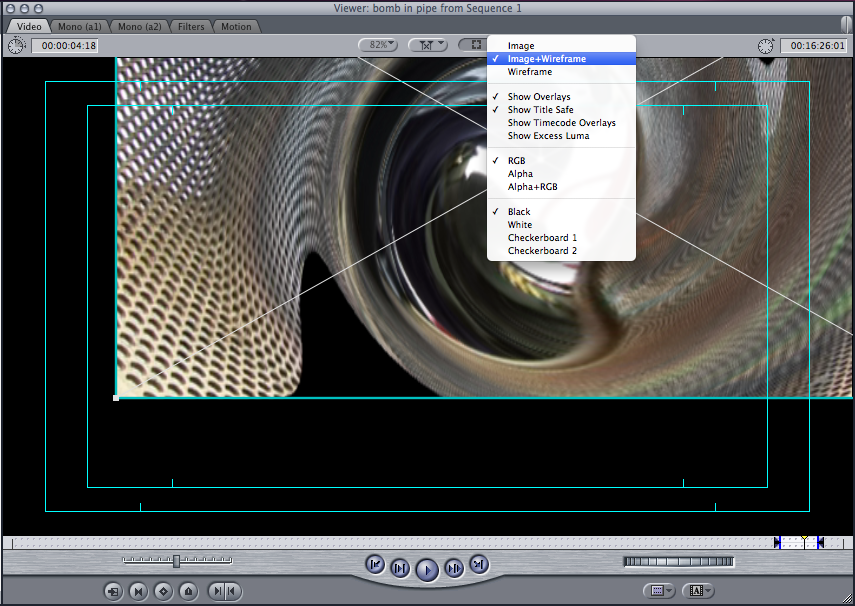
Issue: Image moved in editor

The picture is not centered on the screen. 

This can happen when the wireframe has been used to move the picture.

video editing picture moved
Viewer with offset image

Solution:

Turn on Image + Wireframe and reposition the image in the correct position. Check that the scale in the motion tab is correct.

Explanation:

Final Cut Pro can be used to move or resize the picture to create visual effects such as picture in picture.

Other digital video editing issues